
Student Resources
Help and resources for all our courses.
1. Finding Your Way Around
Here's how to get through your course, from logging in to your certificate.
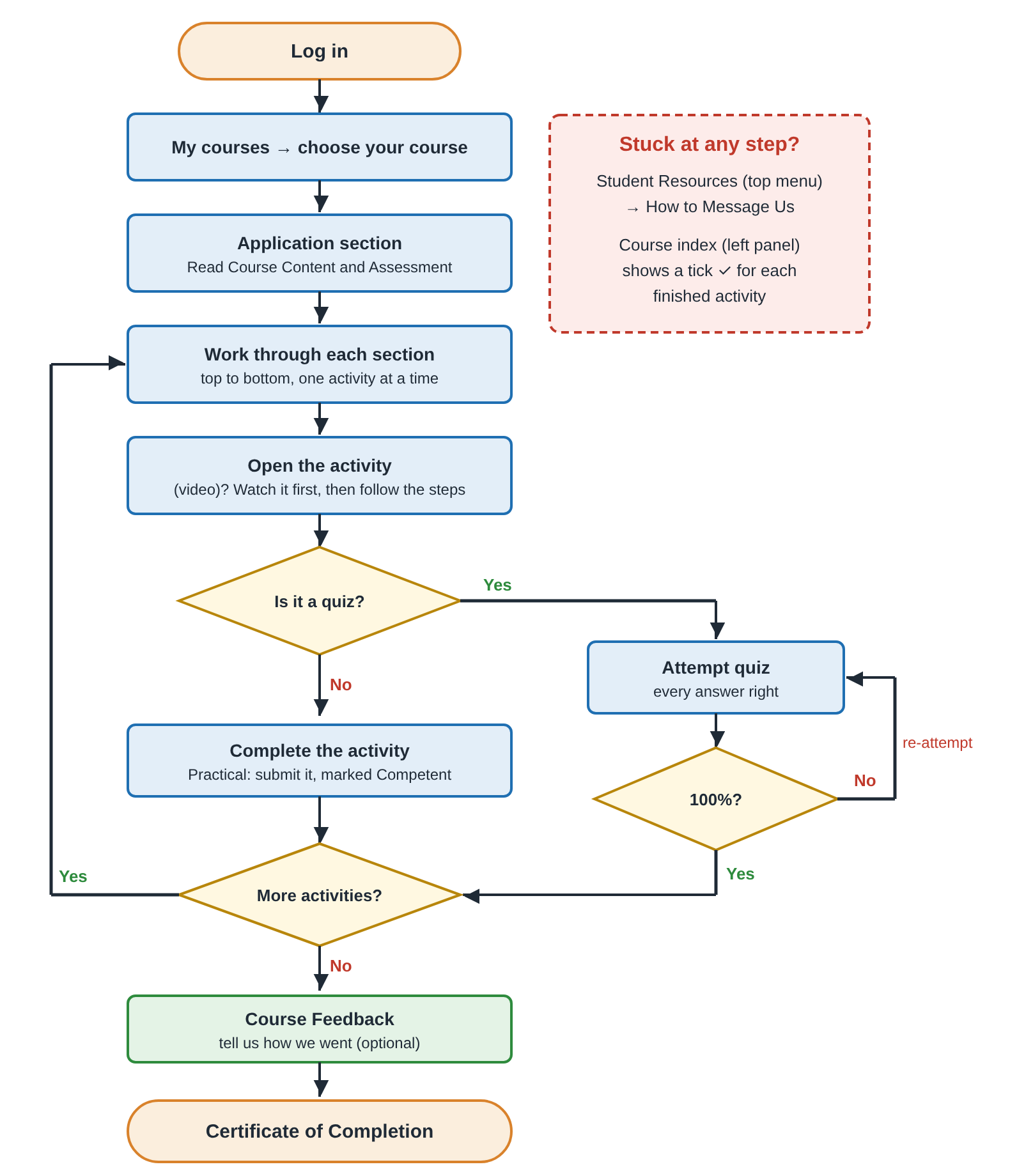
- Log in, click My courses in the top menu, then choose your course.
- Start in the Application section at the top. Read Course Content and Assessment. Assessment shows what you need for your certificate.
- Work through each section from top to bottom, one activity at a time. The list on the left shows every activity in your course. Click one to go straight to it.
- If an activity has (video) in its name, watch the video first, then follow the steps.
- Quizzes: click Attempt quiz. You need every answer right. If you miss one, click Re-attempt quiz.
- Practical tasks: upload your program. Your instructor marks it Competent or Not yet competent. If it's Not yet competent, read your instructor's comments, fix your program and upload it again.
- At the end, fill in Course Feedback. Your Certificate of Completion appears once your instructor has marked your program Competent.
Tips
- The list on the left shows a tick for each activity you've finished.
- Can't see the list on the left? Click this button at the top left, beside the course name. It says Open course index when you point at it.

- Stuck? Go to Student Resources → How to Message Us. We're happy to help.